play movie on microsoft paint
simple first hit the print screen button on the keyboard
when then media files are playing then open paint and
paste by pressing ctrl+v (paste key) voila
the movie starts on the paint application
Sunday, October 3, 2010

Saturday, October 2, 2010
Adobe Air

The Adobe® AIR runtime lets developers use proven web technologies to build rich Internet applications that deploy to the desktop and run across operating systems.
Adobe AIR offers an exciting new way to engage customers with innovative, branded desktop applications, without requiring changes to existing technology, people, or processes.
From shopping on eBay to managing music, Adobe AIR means applications that are easier, more powerful, and more fun to use.
Thursday, September 30, 2010
Motorola Droid x
Motorola DROID X Android Phone (Verizon Wireless)
 Dipped in clarified cyborg testosterone as it comes off the assembly line, the Droid X is sci-fi machismo congealed into a phone. Yet it's gelded by steroidal software—a fussy, awkward android with acne the size of asteroids.
The Droid X is the latest module in a curious outgrowth of smartphone evolution. An industrial slab as vast and barren as a desert planet, it revels in being the most colossal thing that could possibly be called a phone, stretching categorical credulity—and pocket fabric.
Unbridled masculine aggression isn't simply a side effect—it's a marketing tagline. "Are you man enough for this phone?" prods the cyborg eye ripped from a Terminator endoskeleton, chosen by Verizon to be Droid's wordless representative. Is this insecurity? Or is it confidence?
The Droid X is even more mondo than the other Android phone of epic proportions—HTC's Evo, also a juiced-up technical demonstration of how much fancy silicon can be stuffed inside of a phone. The ice scraper-cum-phone is hardware unabashedly designed to provoke the most raging nerd boner possible: 4.3-inch 854x480 screen (slightly higher res than the Evo's 4.3-inch screen), 1GHz TI OMAP processor (a methed-out rendition of the chip inside the original Droid and Palm Pre), 512MB RAM, 24GB storage, 8-megapixel stills, 720p HD video, DLNA compatibility w/ HDMI Micro out, three mics for noise cancellation and wireless N with 3G hotspot powers.
As a pure expression of the limits of mobile hardware and industrial design, the Droid X is kind of a beautiful thing. But that's about the only good thing about the Droid X.
The software—a discordant melange of the not-so-fresh Android 2.1 and various bits of the Blur "social networking" interface from Motorola's lower-end Android phones—is the shudder-inducing poster child for the horrors that can occur when most hardware companies try to make software. It's ugly, scattershot, and confusing. It feels almost malicious.
The creeping feeling that Android is the new Windows becomes an overwhelming sensation the first time you boot up Droid X. Seven sprawling desktop screens, littered with widgets, oodles of little programs—the vast majority of which you probably don't want or need. It's overwhelming and utterly incomprehensible if you're not the kind of person who's seen at least two non-JJ Abrams Star Trek movies. The minutes lost to clearing them to get to a reasonably clean desktop, one press-and-hold-and-swipe gesture at a time, brought me back to the sullen days of removing crapware from whiny relatives' Sony Vaios. Breathtaking hardware, filled to the brim with crap. Why would Motorola make this the first impression of its phone? Stuttering and confusion?
A grizzled nerd would see, on the surface, that the Droid X's interface is a only slightly customized spin of Android—things are mostly just skinned to be Droidier—reds, greens and shades of steel. A more pronounced navbar at the bottom announces which of the seven desktop screens you're sitting on as you slide between them, while a semi-permanent widget keeps the phone app and contacts at the ready. The overt Motoblur interface, upfront, is reduced to a handful Motorola widgets for things like the calendar or social networking. (They're attractive by themselves, but amidst the cyborg orgy they stand out in a bad way.) The gimmick is laid thick, but it's on top of Android, rather than replacing parts of it wholesale.
As soon as you dive into the bits that Motorola aims to seriously augment—the social networking aspects from its Blur interface, things gets really messy. Droid X comes with its own accounts and contacts system for Twitter, Facebook, Picasa, Exchange, MySpace, and more, that all resides on the phone. The idea is that you can update your status for every network simultaneously and keep track of all your friends, across every possible service, using Motorola's widgets and contacts system. While it offers more services, it doesn't work nearly as seamlessly as Android's native apps for Facebook and Twitter. The whole setup feels more like an elegant hack. And God help you if cross streams between Android's official Facebook/Twitter apps and Motorola's. We've reached the point where custom interfaces on top of Android really don't do anything better than Google does. They're almost universally worse.
Software kneecaps this phone at nearly every corner. It makes the sizzling hardware look bad in the process. Watching this phone sputter, which it does occasionally for the even most menial of tasks, like opening the apps menu, feels more egregiously tortuous than normal, given its prodigious size and weight. It's brain-stabbingly maddening if you actually know what's inside of all that. (Verizon and Motorola would no doubt like me to you remind the build I've been using is not quite final, so performance could improve, but it seems like a systemic issue with Android 2.1. Android 2.2, with its massive speed boost and other perks, won't be available for this phone until "late summer.")
Update: It's come to light that the phone might self-destruct if you attempt to mod it, like to run a different version of Android—which runs totally counter to what Android is supposed to be about. That's a massive reason to think twice about buying this phone. Unfortunate, because it hits some of the people who'd most want this kind of hardware. Update 2: Motorola tells us they're looking into the issue.
Click on the gallery to see everything, photos and video, in 100 percent full size. (It should go without saying, but everything is unenhanced.)
The camera app, while it has an impressive range of options and scenes and modes, can be ridiculously slow to actually snap photos, on top of the dragged-down-gravel UI. (Try starting up the app with the camera button. "Is it being slow, or did it register?" is a popular game.) The shutter feedback it gives is poor too, so when I shot the Droid X alongside the iPhone for a day, I wound up reshooting most of the Droid X's photos at least once. Focusing was a constant battle—it'd have something in focus, and then lose it. (As you might notice in the sample gallery. Also, all photos taken from same position as other comparison cameras—the differences in perspective illustrate the difference camera lenses.) Also,the camera quality is pretty soundly trounced by the iPhone 4—both photos and video—which might be the most disappointing aspect of the hardware. (It's possible a software fix could make things wildly better, as they did for the original Droid.)
Dipped in clarified cyborg testosterone as it comes off the assembly line, the Droid X is sci-fi machismo congealed into a phone. Yet it's gelded by steroidal software—a fussy, awkward android with acne the size of asteroids. The Droid X is the latest module in a curious outgrowth of smartphone evolution. An industrial slab as vast and barren as a desert planet, it revels in being the most colossal thing that could possibly be called a phone, stretching categorical credulity—and pocket fabric.
Unbridled masculine aggression isn't simply a side effect—it's a marketing tagline. "Are you man enough for this phone?" prods the cyborg eye ripped from a Terminator endoskeleton, chosen by Verizon to be Droid's wordless representative. Is this insecurity? Or is it confidence?
The Droid X is even more mondo than the other Android phone of epic proportions—HTC's Evo, also a juiced-up technical demonstration of how much fancy silicon can be stuffed inside of a phone. The ice scraper-cum-phone is hardware unabashedly designed to provoke the most raging nerd boner possible: 4.3-inch 854x480 screen (slightly higher res than the Evo's 4.3-inch screen), 1GHz TI OMAP processor (a methed-out rendition of the chip inside the original Droid and Palm Pre), 512MB RAM, 24GB storage, 8-megapixel stills, 720p HD video, DLNA compatibility w/ HDMI Micro out, three mics for noise cancellation and wireless N with 3G hotspot powers.
As a pure expression of the limits of mobile hardware and industrial design, the Droid X is kind of a beautiful thing. But that's about the only good thing about the Droid X.
The software—a discordant melange of the not-so-fresh Android 2.1 and various bits of the Blur "social networking" interface from Motorola's lower-end Android phones—is the shudder-inducing poster child for the horrors that can occur when most hardware companies try to make software. It's ugly, scattershot, and confusing. It feels almost malicious.
The creeping feeling that Android is the new Windows becomes an overwhelming sensation the first time you boot up Droid X. Seven sprawling desktop screens, littered with widgets, oodles of little programs—the vast majority of which you probably don't want or need. It's overwhelming and utterly incomprehensible if you're not the kind of person who's seen at least two non-JJ Abrams Star Trek movies. The minutes lost to clearing them to get to a reasonably clean desktop, one press-and-hold-and-swipe gesture at a time, brought me back to the sullen days of removing crapware from whiny relatives' Sony Vaios. Breathtaking hardware, filled to the brim with crap. Why would Motorola make this the first impression of its phone? Stuttering and confusion?
A grizzled nerd would see, on the surface, that the Droid X's interface is a only slightly customized spin of Android—things are mostly just skinned to be Droidier—reds, greens and shades of steel. A more pronounced navbar at the bottom announces which of the seven desktop screens you're sitting on as you slide between them, while a semi-permanent widget keeps the phone app and contacts at the ready. The overt Motoblur interface, upfront, is reduced to a handful Motorola widgets for things like the calendar or social networking. (They're attractive by themselves, but amidst the cyborg orgy they stand out in a bad way.) The gimmick is laid thick, but it's on top of Android, rather than replacing parts of it wholesale.
As soon as you dive into the bits that Motorola aims to seriously augment—the social networking aspects from its Blur interface, things gets really messy. Droid X comes with its own accounts and contacts system for Twitter, Facebook, Picasa, Exchange, MySpace, and more, that all resides on the phone. The idea is that you can update your status for every network simultaneously and keep track of all your friends, across every possible service, using Motorola's widgets and contacts system. While it offers more services, it doesn't work nearly as seamlessly as Android's native apps for Facebook and Twitter. The whole setup feels more like an elegant hack. And God help you if cross streams between Android's official Facebook/Twitter apps and Motorola's. We've reached the point where custom interfaces on top of Android really don't do anything better than Google does. They're almost universally worse.
Software kneecaps this phone at nearly every corner. It makes the sizzling hardware look bad in the process. Watching this phone sputter, which it does occasionally for the even most menial of tasks, like opening the apps menu, feels more egregiously tortuous than normal, given its prodigious size and weight. It's brain-stabbingly maddening if you actually know what's inside of all that. (Verizon and Motorola would no doubt like me to you remind the build I've been using is not quite final, so performance could improve, but it seems like a systemic issue with Android 2.1. Android 2.2, with its massive speed boost and other perks, won't be available for this phone until "late summer.")
Update: It's come to light that the phone might self-destruct if you attempt to mod it, like to run a different version of Android—which runs totally counter to what Android is supposed to be about. That's a massive reason to think twice about buying this phone. Unfortunate, because it hits some of the people who'd most want this kind of hardware. Update 2: Motorola tells us they're looking into the issue.
Click on the gallery to see everything, photos and video, in 100 percent full size. (It should go without saying, but everything is unenhanced.)
The camera app, while it has an impressive range of options and scenes and modes, can be ridiculously slow to actually snap photos, on top of the dragged-down-gravel UI. (Try starting up the app with the camera button. "Is it being slow, or did it register?" is a popular game.) The shutter feedback it gives is poor too, so when I shot the Droid X alongside the iPhone for a day, I wound up reshooting most of the Droid X's photos at least once. Focusing was a constant battle—it'd have something in focus, and then lose it. (As you might notice in the sample gallery. Also, all photos taken from same position as other comparison cameras—the differences in perspective illustrate the difference camera lenses.) Also,the camera quality is pretty soundly trounced by the iPhone 4—both photos and video—which might be the most disappointing aspect of the hardware. (It's possible a software fix could make things wildly better, as they did for the original Droid.)
How to "Delete administrator Password" without any software
Method 1
Boot up with DOS and delete the sam.exe and sam.log files from Windows\system32\config in your hard drive. Now when you boot up in NT the password on your built-in administrator account which will be blank (i.e No password). This solution works only if your hard drive is FAT kind.
Method 2
Step 1. Put your hard disk of your computer in any other pc .Step 2. Boot that computer and use your hard disk as a secondary hard disk (D'nt boot as primary hard disk ).Step 3. Then open that drive in which the victim’s window(or your window) is installed.Step 4. Go to location windows->system32->configStep 5. And delete SAM.exe and SAM.log
Step 6. Now remove hard disk and put in your computer.
Step 7. And boot your computer :-)
Boot up with DOS and delete the sam.exe and sam.log files from Windows\system32\config in your hard drive. Now when you boot up in NT the password on your built-in administrator account which will be blank (i.e No password). This solution works only if your hard drive is FAT kind.
Method 2
Step 1. Put your hard disk of your computer in any other pc .Step 2. Boot that computer and use your hard disk as a secondary hard disk (D'nt boot as primary hard disk ).Step 3. Then open that drive in which the victim’s window(or your window) is installed.Step 4. Go to location windows->system32->configStep 5. And delete SAM.exe and SAM.log
Step 6. Now remove hard disk and put in your computer.
Step 7. And boot your computer :-)
Whenever I start my computer, Scandisk starts running even I proper shut down the PC last time.
Solution:
Do as following:
A. Open regedit and goto:
Code:
HKEY_LOCAL_MACHINE\SYSTEM\CurrentControlSet\Control\Session Manager
In right-side pane, change the value of BootExecute to:
autocheck autochk *
B. If the above trick doesnt help then give following commands in Command Prompt:
chkntfs /x drive_name
for e.g., if ScanDisk runs automatically for C: and D: drives, then give following commands one by one:
chkntfs /x C:
chkntfs /x D:
Do as following:
A. Open regedit and goto:
Code:
HKEY_LOCAL_MACHINE\SYSTEM\CurrentControlSet\Control\Session Manager
In right-side pane, change the value of BootExecute to:
autocheck autochk *
B. If the above trick doesnt help then give following commands in Command Prompt:
chkntfs /x drive_name
for e.g., if ScanDisk runs automatically for C: and D: drives, then give following commands one by one:
chkntfs /x C:
chkntfs /x D:
Double-clicking any drive opens search option:
Solution 1:
That's a virus named as ravmon.exe and autorun.inf
Scan first with a good antivirus [Nod32 Recommanded]
then try this trick.
First show the hidden files and folders options then try this method
1. Go to Start-->run and type cmd then click ok
2. If u want to remove the infected file from c drive then type C: in command prompt and press enter
3. Type autorun.inf and press enter
autorun.inf file is opened
4. Now type "attrib autorun.inf -s -h -r" and press enter
5. Now delete the file by typing
"del autorun.inf" and press enter
6.Now type autorun.inf and press enter now, u will find no infected autorun.inf file.
7. same way do for all other drives then restart ur pc
That's a virus named as ravmon.exe and autorun.inf
Scan first with a good antivirus [Nod32 Recommanded]
then try this trick.
First show the hidden files and folders options then try this method
1. Go to Start-->run and type cmd then click ok
2. If u want to remove the infected file from c drive then type C: in command prompt and press enter
3. Type autorun.inf and press enter
autorun.inf file is opened
4. Now type "attrib autorun.inf -s -h -r" and press enter
5. Now delete the file by typing
"del autorun.inf" and press enter
6.Now type autorun.inf and press enter now, u will find no infected autorun.inf file.
7. same way do for all other drives then restart ur pc
Task Manager Disabled:
Using Group Policy Editor - for Windows XP Professional to Enable Task Manager.
* Click Start, Run, type gpedit.msc and click OK.
* Navigate to this branch:
User Configuration / Administrative Templates / System / Ctrl+Alt+Delete Options / Remove Task Manager
* Double-click the Remove Task Manager option.
* Set the policy to Not Configured.
Enable RegEdit [It is not tested]
REGEDIT4
[HKEY_CURRENT_USER\Software\Microsoft\Windows\CurrentVersio
n\Policies\System]
"DisableRegistryTools"=dword:00000000
Save the text file as any name u with extension .reg
example:- "enable.reg"
After that double click to run the file.
Note:DO SCAN YOUR MACHINE WITH A GOOD ANTIVIRUS. BECAUSE THIS PROGRAMS DON'T TURNED OFF BY HIMSELF OR AUTOMATICALLY. IT HAS TO A VIRUS EFFECT OR A ADMINISTRATOR HAS TO MANUALLY DISABLE THIS PROGRAMS.
* Click Start, Run, type gpedit.msc and click OK.
* Navigate to this branch:
User Configuration / Administrative Templates / System / Ctrl+Alt+Delete Options / Remove Task Manager
* Double-click the Remove Task Manager option.
* Set the policy to Not Configured.
Enable RegEdit [It is not tested]
REGEDIT4
[HKEY_CURRENT_USER\Software\Microsoft\Windows\CurrentVersio
n\Policies\System]
"DisableRegistryTools"=dword:00000000
Save the text file as any name u with extension .reg
example:- "enable.reg"
After that double click to run the file.
Note:DO SCAN YOUR MACHINE WITH A GOOD ANTIVIRUS. BECAUSE THIS PROGRAMS DON'T TURNED OFF BY HIMSELF OR AUTOMATICALLY. IT HAS TO A VIRUS EFFECT OR A ADMINISTRATOR HAS TO MANUALLY DISABLE THIS PROGRAMS.
I can't see Hidden files/folders in my computer. Even I enable the option "Show hidden files/folders" in "Tools -> Folder Options", its automatically disabled again.
Solution1: Go to your Start menu, click on Run and open up your Registry Editor by typing "regedit" without the quotes and pressing OK.
Once there go to: HKEY_LOCAL_MACHINE\Software\Microsoft\Windows\CurrentVersion\Explorer\Advanced\Folde r\Hidden\SHOWALL
Delete the value CheckedValue. (Its type should be REG_SZ and data should be 0 or 1.)
Create a new DWORD value called CheckedValue (same as above, except that the type is REG_DWORD) by right clicking on the right pane->New->DWORD Value. Modify the value data to 1 (0x00000001).
Solution 2: Open regedit and goto:
HKEY_CURRENT_USER\Software\Microsoft\Windows\CurrentVersion\Explorer\Advanced
In right-side pane, change value of "Hidden" to as following:
1 - To show hidden file
2 - To not show hidden files
If it doesn't work, then scan your computer with an anti-virus software.
Once there go to: HKEY_LOCAL_MACHINE\Software\Microsoft\Windows\CurrentVersion\Explorer\Advanced\Folde r\Hidden\SHOWALL
Delete the value CheckedValue. (Its type should be REG_SZ and data should be 0 or 1.)
Create a new DWORD value called CheckedValue (same as above, except that the type is REG_DWORD) by right clicking on the right pane->New->DWORD Value. Modify the value data to 1 (0x00000001).
Solution 2: Open regedit and goto:
HKEY_CURRENT_USER\Software\Microsoft\Windows\CurrentVersion\Explorer\Advanced
In right-side pane, change value of "Hidden" to as following:
1 - To show hidden file
2 - To not show hidden files
If it doesn't work, then scan your computer with an anti-virus software.
Increase Hard Disk speed in Windows
If you like to increase/optimize your Hard Disk I/O - read/write speed without buying expensive software utilities to do that job or changing the HD, just follow next steps. With doing these steps you will increase Hard disk speed (depends of manufacture and specification, but its worth to try). The most speed improvement is visible with IDE drives; however there are reports that this tweak also does good for SCSI disks.
In any case, it won't harm your system, so try it yourself and let me know what you find!
NOTE-Works only on XP
Steps:
1. Run SYSEDIT.EXE from the start & then Run command.
2. Expand the system.ini file window.
3. Scroll down almost to the end of the file untill you find a line called [386enh].
4. Press Enter to make one blank line, and in that line type
5. Irq14=4096 (note: This line IS CASE SENSITIVE)
6. Click on the File menu, then choose Save.
7. Close SYSEDIT and reboot your computer.
8. Restart windows!
In any case, it won't harm your system, so try it yourself and let me know what you find!
NOTE-Works only on XP
Steps:
1. Run SYSEDIT.EXE from the start & then Run command.
2. Expand the system.ini file window.
3. Scroll down almost to the end of the file untill you find a line called [386enh].
4. Press Enter to make one blank line, and in that line type
5. Irq14=4096 (note: This line IS CASE SENSITIVE)
6. Click on the File menu, then choose Save.
7. Close SYSEDIT and reboot your computer.
8. Restart windows!
Speedup Your Folder Browsing.
You may have noticed that everytime you open my computer to browse folders that there is a slight delay. This is because Windows XP automatically searches for network files and printers everytime you open Windows Explorer. To fix this and to increase browsing significantly:
1. Open My Computer
2. Click on Tools menu
3. Click on Folder Options
4. Click on the View tab.
5. Uncheck the Automatically search for network folders and printers check box
6. Click Apply
7. Click Ok
8. Reboot your computer
1. Open My Computer
2. Click on Tools menu
3. Click on Folder Options
4. Click on the View tab.
5. Uncheck the Automatically search for network folders and printers check box
6. Click Apply
7. Click Ok
8. Reboot your computer
Remove Autorun Virus Infection - Solution for USB, PC & Laptops.
Nowadays, there is a new problem that is cropping up in almost all schools,colleges, hostels etc. where the malicious Autorun Virus is Creating Havoc by spreading to Laptops and PC through USB Drives etc.

Panda USB Vaccine is a 100% free utility. Its tested under Windows 2000 SP4, Windows XP SP1-SP3, and Windows Vista SP0 and SP1.
How to Stop the Autorun PC Virus Infection ?
The free Panda USB Vaccine allows users to vaccinate their PCs in order to disable Autorun completely so that no program from any USB/CD/DVD drive (regardless of whether they have been previously vaccinated or not) can auto-execute. This is a really helpful feature as there is no user friendly and easy way of completely disabling Autorun on a Windows PC.Panda USB Vaccine is a 100% free utility. Its tested under Windows 2000 SP4, Windows XP SP1-SP3, and Windows Vista SP0 and SP1.
Download complete websites to your desktop and surf them offline.
 Website eXtractor saves you time and effort by downloading entire Internet sites (or the sections you stipulate) to your hard drive.
 Whether you browse the web for research, work, or fun, there's nothing worse than having to wait for page after page to load in Internet Explorer or Netscape Navigator (or in other popular browsers). The problem is they will only load one page at a time. So if you are viewing a large website with a thousand pages, you'd have to click the mouse a thousand times ... and ... choose a directory/folder a thousands times when you want to save each file. You end up spending a lot of time waiting around and not enough time reading or viewing pages on the Internet.
Note: Using a regular browser to surf large websites or photo galleries takes the fun out of web browsing and makes research a real chore.
But now, with WebSite eXtractor, you can download whole websites (or parts of them) in one go to your computer. You can then view the whole site offline at your leisure - and you can whiz through the saved pages at lightning speed.
WebSite eXtractor is a great tool for researchers, journalists, students, equity analysts, business and marketing executives - as well as for those who want to browse family websites containing digital photo albums.
Advantages :
- Transfer whole websites to CD-ROM or floppy
- Another big benefit of the program is it changes html-links to relative names. In other words, it turns web addresses (URLs) into addresses that work on your computer.
- Researchers, writers, and journalists can easily archive reference material from the Internet.
- The program can download up to 100 files at a time, which saves you a huge amount of time compared to ordinary browsers.
- Website eXtractor automatically lets you download any files that were not copied due to transfer errors or bad connections.
Saturday, August 14, 2010
Reset Nokia Security/Lock code to 12345

You will need a card reader to perform this operation.
1) Remove memory card from your locked Nokia mobile phone.
2) Put your card into card reader and connect it with your computer. Create
the directory SystemRecogs and copy thc-nokia-unlock.mdl into this directory. So at the end your file will be in System/recogs directory of your mmc.
the directory SystemRecogs and copy thc-nokia-unlock.mdl into this directory. So at the end your file will be in System/recogs directory of your mmc.
3) Remove the Memory Card and place it into the locked phone.
4) Now start your locked phone and wait for some time when it asks for the code. Let this tool reset the code for you. Wait for 2 minutes and then enter 12345 in the code box.
5) Done. Your security code will be reset to 12345.
This method is tested on Nokia N72 and it’s 100% working. Ask me if you need any help on this.
DOWNLOAD NOKIA THC UNLOCK (1 KB)(.mdl file)(RS)
NEW LINK:- DOWNLOAD NOKIA THC UNLOCK (1 KB)(.rar file)(MediaFire)
Windows 7 Tricks: Enable Hidden Admin Account, Automatic Logon
If you did not get your Beta version of Windows 7 to put to the test, then hurry up and do so before Microsoft pull download availability for it; if you are already using Windows 7 Build 7000 which you downloaded directly from Microsoft, and you are happy with it, then perhaps you would like to play with the settings, tweak the operating system so that it better suits your needs and preferences.
When installing Windows 7, the software will automatically set up an administrator account, which will later on be disabled (default behavior that also occurs when installing Windows Vista). Whenever you want to perform tasks under the administrator account with no UAC (user account control), you need to enable the admin account. A word of warning first: it is advisable not use the admin account on a day to day basis, only enable it when you have to address some problem or issue that can only be fixed otherwise (guest accounts offer limited accessibility, but from a security point of view are safer).
To enable the admin account, follow this simple step by step tutorial:
- Right click on Command Prompt -> Run as administrator -> type in the command “net user administrator /active:yes”.
- You might want to password protect you newly enabled admin account, so type in “Net user administrator password”. Replace “password” with the password of your choice, just make sure not to forget it.
- Log off after the command has been executed. When you login you will notice that the admin account has been enabled. To disable it once again, use the “net user administrator /active:no” command.
Alternative way of enabling the admin account:
- Start -> Search -> type in “secpol.msc” -> Local Policies -> Security Options -> Accounts: Administrator Account -> double click to enable/disable -> Log off and log back in to see the modifications.
Windows has enough boot speed issues for you to have to bother with the logon screen in Windows 7. This little tweak may not do much in terms of boot speed but it will get rid of the OS’s account password protection thus letting you login automatically – which makes sense if you are the only person using the computer and you need not password protect it from other users.
Follow these simple step by step instructions to enable Windows 7 to automatically log you in:
- Press Win + R to access Run -> type in “control userpasswords2” -> Enter.
- In the User Accounts windows that has just appeared before you, uncheck “Users must enter a user name and password to use this computer” -> OK. You will have to confirm your password for the OS to process the modifications.
When installing Windows 7, the software will automatically set up an administrator account, which will later on be disabled (default behavior that also occurs when installing Windows Vista). Whenever you want to perform tasks under the administrator account with no UAC (user account control), you need to enable the admin account. A word of warning first: it is advisable not use the admin account on a day to day basis, only enable it when you have to address some problem or issue that can only be fixed otherwise (guest accounts offer limited accessibility, but from a security point of view are safer).
To enable the admin account, follow this simple step by step tutorial:
- Right click on Command Prompt -> Run as administrator -> type in the command “net user administrator /active:yes”.
- You might want to password protect you newly enabled admin account, so type in “Net user administrator password”. Replace “password” with the password of your choice, just make sure not to forget it.
- Log off after the command has been executed. When you login you will notice that the admin account has been enabled. To disable it once again, use the “net user administrator /active:no” command.
Alternative way of enabling the admin account:
- Start -> Search -> type in “secpol.msc” -> Local Policies -> Security Options -> Accounts: Administrator Account -> double click to enable/disable -> Log off and log back in to see the modifications.
Windows has enough boot speed issues for you to have to bother with the logon screen in Windows 7. This little tweak may not do much in terms of boot speed but it will get rid of the OS’s account password protection thus letting you login automatically – which makes sense if you are the only person using the computer and you need not password protect it from other users.
Follow these simple step by step instructions to enable Windows 7 to automatically log you in:
- Press Win + R to access Run -> type in “control userpasswords2” -> Enter.
- In the User Accounts windows that has just appeared before you, uncheck “Users must enter a user name and password to use this computer” -> OK. You will have to confirm your password for the OS to process the modifications.
Download Multiple Free Files From Rapidshare
Rapidshare allows to download only a single file at a time with free account. If you want to download multiple files at the same time, you need to buy a premium account but now you can download multiple files from Rapidshare free account without paying anything with RapidShare Download Accelerator.

With RapidShare Download Accelerator, you can add all the files you'd like to download, and it will do all the annoying work for you. Now you can just sit back and watch your files download without paying a dime.
Links : Download Rapidshare Download Accelerator
With RapidShare Download Accelerator, you can add all the files you'd like to download, and it will do all the annoying work for you. Now you can just sit back and watch your files download without paying a dime.
Links : Download Rapidshare Download Accelerator
How to access the sharing data offline
Access the shared data offline allows you to keep using your shared files, folders and software programs when disconnected from the data server. When you reconnect to your data server, all files will be synchronized to the files on the network.
There are two types of configurations required to set the access shared folders offline available, one for data server and other for client computer.
Configuration on Data Server.
First locate the folders that you would like to share or make new folders then share these folders so they can be accessible to any one on the network.
Now right click on that folder and click on the option "Sharing and security".
Now set the share level permissions that you want to give the users on every folder. Enable cache of share folders by click on cache button (by default it will be enabled).
Configuration on Client Computer
On the client computer, first open My Computer then click on Tools.
In Tools menu bar, click on Folder Options, a window will appear with the title Folder Options.
Under the Offline File tab, check the option Enable Offline File. Here you can choose the synchronization process "Synchronize all offline files when logging on", "Synchronize all offline files before logging off" and others.
Click on Apply button to save the settings and then Ok button to close this window.
Now sitting on the client computer, try to access the shared folder from the data server.
First Right click on the shared folder and Click on Make available offline.
To synchronizing the offline work from client computer to data server, again open My Computer then click on Tools. Click on Synchronize then click on synchronizing button. Thursday, July 29, 2010
Extreme Gaming PC
Extreme XHD Gaming PC Configuration:
| Product | Amount | |
|---|---|---|
| 7-Outlet surge suppressor | 1 | |
| Logitech MX Revolution Cordless Laser Mouse | 1 | |
| Logitech G15 Gaming Keyboard 2nd Generation | 1 | |
| Samsung 275T Plus 27IN Widescreen LCD Monitor 1920X1200 3000:1DC 5ms HAS VGA DVI-D HDMI | 1 | |
| 2-Year Limited Warranty | 1 | |
| Microsoft Windows 7 Ultimate Edition 64BIT DVD OEM | 1 | |
| Dual Cold Cathode Light 12 Inch Yellow | 1 | |
| NZXT Sentry LX High Performance Aluminum Fan Controller Black W/ LCD Dual 5.25 | 1 | |
| Maximum number of quiet fans | 1 | |
| Zalman GT1000 Z-Machine Mid-tower Aluminum Windowed Titanium | 1 | |
| Corsair HX1000 1000W modular Active PFC | 1 | |
| Hauppauge HD-PVR High Definition Video Recorder USB H.264 MPEG4 Component Up to 1080I W/ IR Blaster | 1 | |
| Internal Data/Fax Modem V.92 PCI | 1 | |
| Creative Sound Blaster X-Fi Titanium FATAL1TY Champion PCI-E 7.1 | 1 | |
| D-LINK DWA-556 Xtreme N Desktop Adapter 802.11 Draft N B/G 3X3 PCI-E1 Adapter | 1 | |
| Intel PRO/1000 PT Dual Port Gigabit Server Adapter PCI-E | 1 | |
| Internal 8-in-1 Card Reader | 1 | |
| LG Black BLU-RAY Writer 8X BD-R 16X DVD-R SATA Lightscribe Internal Drive | 1 | |
| LG Black BLU-RAY 8X Reader & 16X DVD Writer Combo Internal SATA Lightscribe | 1 | |
| RAID Level 0 (striping) | 1 | |
| Western Digital Caviar Black 2000GB 32MB 7200RPM SATA2 Dual-processor | 1 | |
| Western Digital Caviar Black 2000GB 32MB 7200RPM SATA2 Dual-processor | 1 | |
| Corsair Storage Solutions 256GB 2.5IN SATA2 Solid State Disk Flash Drive SSD | 1 | |
| Corsair Storage Solutions 256GB 2.5IN SATA2 Solid State Disk Flash Drive SSD | 1 | |
| Dual NVIDIA GeForce GTX 295 1792MB in Quad-SLI | 1 | |
| 12GB Triple-channel Corsair Dominator: 6 x 2048MB DDR3 1600MHz | 1 | |
| Stage 2 Water Cooling: Self-contained maintenance-free dual-radiator water cooling system | 1 | |
| Intel Core i7 Extreme 965 3.2GHz x 4 with HyperThreading 6.4GT/s FSB 8MB cache overclocked to 3.84GHz | 1 | |
| ASUS Rampage II Extreme ATX LGA1366 X58 DDR3 3PCI-E16 2PCI-E1 PCI CrossFire SLI | 1 | |
| Product summary: | $10,104.36 | |
Tuesday, July 27, 2010
Origin EON18


General
- Built-in Devices Four speakers , Bluetooth antenna , Wireless LAN antenna
- Width 17.2 in
- Depth 11.7 in
- Height 1.7 in
- Weight 12.6 lbs
Processor
- Processor Intel Core i7 Extreme Edition I7-920XM / 2 GHz
- Multi-Core Technology Quad-Core
- 64-bit Computing Yes
- Data Bus Speed 1333 MHz
- Chipset Type Mobile Intel PM55 Express
Cache Memory
- Type L3 cache
- Cache size 8 MB
RAM
- Installed Size 8 GB
- Technology DDR3 SDRAM - 1333 MHz
- RAM configuration features 2 x 4 GB
Storage Controller
- Storage controller type Serial ATA
- Storage Controller / Serial ATA Interface Serial ATA-300
Storage
- Floppy Drive None
- Hard Drive 80 GB Solid State Drive - Serial ATA-300
- Hard Drive (2nd) 500 GB - Serial ATA-300 - 7200 rpm
- Storage Removable None
- Hard drive type Solid state
Optical Storage (2nd)
- 2nd optical storage type None
Card Reader
- Card reader type 7 in 1 card reader
- Supported flash memory cards RS-MMC , miniSD , Memory Stick , MultiMediaCard , SD Memory Card , Memory Stick Duo , Memory Stick Pro
Display
- Display Type 18.4 in TFT active matrix
- Max Resolution 1920 x 1080
- Widescreen Display Yes
- Features Glossy
Video
- Multi-GPU Configuration 2 single GPU cards (SLI)
- Graphics Processor / Vendor NVIDIA GeForce GTX 285M
- Video Memory 1 GB GDDR3 SDRAM
Audio
- Audio output type Sound card
- Audio output compliant standards High Definition Audio
Notebook Camera
- Camera Type Integrated
- Sensor Resolution 2 Megapixel
Input Device(s)
- Input device type Keyboard , Touchpad
Telecom
- Modem None
Networking
- Networking Network adapter
- Networking / Wireless LAN Supported Yes
- Data link protocol Ethernet , IEEE 802.11a , IEEE 802.11b , IEEE 802.11g , Fast Ethernet , Gigabit Ethernet , Bluetooth 2.1 EDR , IEEE 802.11n (draft)
- Networking standards IEEE 802.11a , IEEE 802.11b , IEEE 802.11g , Bluetooth 2.1 , IEEE 802.11n (draft)
Expansion / Connectivity
- Expansion Slots Total (Free) Memory , 1 ( 1 ) x ExpressCard/54
- Interfaces 1 x Display / video - VGA - 15 pin HD D-Sub (HD-15) , 1 x Microphone - Input - Mini-phone 3.5 mm , 1 x Headphones - Output - Mini-phone stereo 3.5 mm , 1 x Storage / Hi-Speed USB - Hi-Speed USB / eSATA , 1 x Audio / video - HDMI - 19 pin HDMI Type A , 1 x Network - Ethernet 10Base-T/100Base-TX/1000Base-T - RJ-45 , 4 x Hi-Speed USB - 4 pin USB Type A , 1 x IEEE 1394 (FireWire) - 4 pin FireWire , 1 x Audio - SPDIF output - TOSLINK
Power
- Power device form factor External
- Voltage Required AC 120/230 V
Battery
- Technology Lithium ion
- Installed Qty 1
- Battery capacity 4650 mAh
Operating System / Software
- OS Provided Microsoft Windows 7 Ultimate 64-bit Edition
Toshiba Satellite A665-S6070
he good: Powerful processor; large hard drive.
The bad: Plastic body feels cheap; low screen resolution.The bottom line: Toshiba's 16-inch Satellite A665-S6070 desktop replacement offers plenty of performance for just under $1,000, unfortunately wrapped in a dull plastic case.


General
- Width 15.0 in
- Depth 10.0 in
- Height 1.5 in
- Weight 5.8 lbs
- Color Slate
Processor
- Processor Intel Core i7 720QM / 1.6 GHz
Cache Memory
- Cache size 6 MB
RAM
- Installed Size 4 GB / 8 GB (max)
- Technology DDR3 SDRAM
Storage Controller
- Storage controller type Serial ATA
Storage
- Floppy Drive None
- Hard Drive 640 GB
- Storage Removable None
- Hard drive type Standard
Optical Storage
- Type DVD+/-RW
- CD / DVD read speed 24x (CD) / 8x (DVD)
- CD / DVD write speed 24x (CD) / 8x (DVD) / 5x (DVD-RAM) / 6x (DVD Double layer)
Display
- Display Type 16.0 in TFT active matrix
- Max Resolution 1366 x 768
- Features TruBrite technology
Video
- Graphics Processor / Vendor NVidia GeForce 310M
- Video Memory 512 MB
Audio
- Audio output type Sound card
Input Device(s)
- Input device type Keyboard , Touchpad
Networking
- Data link protocol Ethernet , Fast Ethernet
Expansion / Connectivity
- Expansion Slots Total (Free) Memory , Memory card reader , ExpressCard
- Interfaces 4 x USB 2.0 - USB 2.0 , 1 x Ethernet - RJ-45 , 1 x HDMI
Miscellaneous
- Features 802.11b/g/n Wireless LAN , Camera
Battery
- Technology Lithium ion
- Installed Qty 1
- Mfr estimated battery life 3.5 hour(s)
Operating System / Software
- OS Provided Microsoft Windows 7 Home Premium
- Software Drivers & Utilities , Microsoft Works 9.0
Sustainability
Dell Inspiron i14R-2265MRB
- Manufacturer: Dell, Inc.
- Part Number:i14R-2265MRB

General
- Width 13.5 in
- Depth 9.9 in
- Height 1.2 in
- Weight 4.9 lbs
- Color Mars black
- Notebook type Thin-and-light (3-5 lbs.)
The good: Streamlined look, easy-to-use keyboard and touch pad; built-in WiMax antenna; fast Core i5 processor.
The bad: WiMax may not be of much use, as it's not available in most major cities yet.
The bottom line: With Windows 7 Professional and built-in WiMax, the Dell i14R-2265MRB is a retail laptop angling for the professional market, and as such might be a good option for a budget small-business machine.


Processor
- Processor Intel Core i5 450M / 2.66 GHz
Cache Memory
- Cache size 3 MB
RAM
- Installed Size 4 GB / 8 GB (max)
- Technology DDR3 SDRAM
Storage Controller
- Storage controller type Serial ATA
Storage
- Floppy Drive None
- Hard Drive 500 GB
- Storage Removable None
- Hard drive type Standard
Optical Storage
- Type DVD+/-RW
Display
- Display Type 14.0 in TFT active matrix
- Max Resolution 1366 x 768
Video
- Graphics Processor / Vendor Intel HD Graphics
Audio
- Audio output type Sound card
Input Device(s)
- Input device type Keyboard , Touchpad
Networking
- Data link protocol Ethernet , Fast Ethernet , Gigabit Ethernet
Expansion / Connectivity
- Expansion Slots Total (Free) Memory , Memory card reader , Mini card
- Interfaces 3 x USB 2.0 - USB 2.0 , 1 x Ethernet - RJ-45 , 1 x HDMI
Miscellaneous
- Cables Included Power cable ( 1 pcs.) , AC power cable ( 1 pcs.)
- Features 802.11b/g/n Wireless LAN , Bluetooth , Camera
Battery
- Technology Lithium ion
- Installed Qty 1
- Mfr estimated battery life 5.3 hour(s)
Operating System / Software
- OS Provided Microsoft Windows 7 Professional
- Software Drivers & Utilities
Sustainability
- Greenpeace policy rating (May 2010) 4.3
Friday, July 23, 2010
Micromax x500
Micromax X500 is a candy bar touch screen mobile that packs with all the necessary specifications that one wishes. Its large touch screen with sense flow is a 2.8 inch QVGA display that supports wide colors up to 262K. Working with the physical measurements, X500 weighs about 110gms with dimensions 117*52*15 mm. X500 can be handy for photo lovers as its 5MP camera just reminds of the Digicam for great pictures.
The phone has multi format music players and recorders that support most of the standard formats with background music playback. Its internal memory is restricted to 87 MB and can be expanded to 8 GB with the micro SD card.
a palpable is the antidote for civilization.
Micromax X500 Specifications:
The phone has multi format music players and recorders that support most of the standard formats with background music playback. Its internal memory is restricted to 87 MB and can be expanded to 8 GB with the micro SD card.
a palpable is the antidote for civilization.
Micromax X500 Specifications:
| Messaging | SMS | Yes |
| MMS | Yes | |
| Yes | ||
| Push Mail | No | |
| Camera | Camera | Yes |
| Mega Pixels | 5.0 MP with LED Flash | |
| Camera Zoom | 4X Zoom Auto Focus | |
| Video Capture | Yes | |
| Connectivity | Ports | USB Port |
| Infrared | No | |
| Bluetooth | Bluetooth Ver. 2.0 | |
| Wifi | No | |
| Internet | GPRS, WAP | |
| Entertainment | Music Player | Multi Format-MP3 / AMR / MIDI / WAV |
| FM Radio | Yes | |
| Games | 2 Preloaded Games | |
| Ring Tones | Yes | |
| Technology | 3G | No |
| Java Technology | Yes | |
| Network | Standby Time | Upto 150 Hours |
| Operating Frequency | Tri-band 900/1800/1900 MHz | |
| Talk Time | Upto 4 Hours | |
| GPS | No | |
| Phone Kit | KIT | Handset, Transceiver, USB Cable, User Guide |
| Battery Weight | 110g | |
| Charger | Included | |
| Headset | Included | |
| Speaker | Yes |
Monday, July 19, 2010
Overclocking
Overclocking is the process of running a computer component at a higher clock rate (more clock cycles per second) than it was designed for or was specified by the manufacturer, usually practiced by enthusiasts seeking an increase in the performance of their computers. Some purchase low-end computer components which they then overclock to higher clock rates, or overclock high-end components to attain levels of performance beyond the specified values. Others overclock outdated components to keep pace with new system requirements, rather than purchasing new hardware.
People who overclock their components mainly focus their efforts on processors, video cards, motherboard chipsets, and random-access memory (RAM). It is done through manipulating the CPU multiplier and the motherboard's front side bus (FSB) clock rate until a maximum stable operating frequency is reached, although with the introduction of Intel's new X58 chipset and the Core i7 processor, the front side bus has been replaced with the QPI (Quick Path Interconnect); often this is called the Baseclock (BCLK). While the idea is simple, variation in the electrical and physical characteristics of computing systems complicates the process. CPU multipliers, bus dividers, voltages, thermal loads, cooling techniques and several other factors such as individual semiconductor clock and thermal tolerances can affect it. Every component has its unique limits with higher clocks and voltage. Two different CPUs may clock completely differently, one being stable with higher clocks at a similar temperature as the other. The bus and memory stability and tolerances also affect how stable an overclocking can be.
There are several considerations when overclocking. First is to ensure that the component is supplied with adequate power to operate at the new clock rate. However, supplying the power with improper settings or applying excessive voltage can permanently damage a component. Since tight tolerances are required for overclocking, only more expensive motherboards—with advanced settings that computer enthusiasts are likely to use—have built-in overclocking capabilities. Motherboards with fewer settings, such as those found in Original Equipment Manufacturer (OEM) systems, often do not support overclocking.

Water cooling carries waste heat to a radiator. Thermoelectric cooling devices, also known as Peltier devices, are recently popular with the onset of high Thermal Design Power (TDP) processors made by Intel and AMD. Thermoelectric cooling devices create temperature differences between two plates by running an electric current through the plates. This method of cooling is highly effective, but itself generates significant heat. For this reason, it is often necessary to supplement thermoelectric cooling devices with a convection-based heatsink or a water-cooling system.
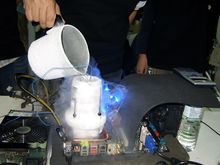 Other cooling methods are forced convection and phase change cooling which is used in refrigerators. Liquid nitrogen, liquid helium, and dry ice are used as coolants in extreme cases, such as record-setting attempts or one-off experiments rather than cooling an everyday system. In June 2006, IBM and Georgia Institute of Technology jointly announced a new record in silicon-based chip clock rate above 500 GHz, which was done by cooling the chip to 4.5 K (−268.7 °C; −451.6 °F) using liquid helium.These extreme methods are generally impractical in the long term, as they require refilling reservoirs of vaporizing coolant, and condensation can be formed on chilled components. Moreover, silicon-based junction gate field-effect transistors (JFET) will degrade below temperatures of roughly 100 K (−173 °C; −280 °F) and eventually cease to function or "freeze out" at 40 K (−233 °C; −388 °F) since the silicon ceases to be semiconducting so using extremely cold coolants may cause devices to fail.
Submersion cooling, used by the Cray-2 supercomputer, involves sinking a part of computer system directly into a chilled liquid that is thermally conductive but has low electrical conductivity. The advantage of this technique is that no condensation can form on components. A good submersion liquid is Fluorinert made by 3M, which is expensive and can only be purchased with a permit. Another option is mineral oil, but impurities such as those in water might cause it to conduct electricity.
In general, overclockers claim that testing can ensure that an overclocked system is stable and functioning correctly. Although software tools are available for testing hardware stability, it is generally impossible for any private individual to thoroughly test the functionality of a processor. Achieving good fault coverage requires immense engineering effort; even with all of the resources dedicated to validation by manufacturers, faulty components and even design faults are not always detected.
A particular "stress test" can verify only the functionality of the specific instruction sequence used in combination with the data and may not detect faults in those operations. For example, an arithmetic operation may produce the correct result but incorrect flags; if the flags are not checked, the error will go undetected.
To further complicate matters, in process technologies such as silicon on insulator, devices display hysteresis—a circuit's performance is affected by the events of the past, so without carefully targeted tests it is possible for a particular sequence of state changes to work at overclocked rates in one situation but not another even if the voltage and temperature are the same. Often, an overclocked system which passes stress tests experiences instabilities in other programs.
In overclocking circles, "stress tests" or "torture tests" are used to check for correct operation of a component. These workloads are selected as they put a very high load on the component of interest (e.g. a graphically-intensive application for testing video cards, or different math-intensive applications for testing general CPUs). Popular stress tests include Prime95, Everest, Superpi, OCCT, IntelBurnTest/Linpack/LinX, SiSoftware Sandra, BOINC, Intel Thermal Analysis Tool and Memtest86. The hope is that any functional-correctness issues with the overclocked component will show up during these tests, and if no errors are detected during the test, the component is then deemed "stable". Since fault coverage is important in stability testing, the tests are often run for long periods of time, hours or even days. An overclocked computer is sometimes described using the number of hours and the stability program used, such as "prime 12 hours stable".
Given only benchmark scores it may be difficult to judge the difference overclocking makes to the overall performance of a computer. For example, some benchmarks test only one aspect of the system, such as memory bandwidth, without taking into consideration how higher clock rates in this aspect will improve the system performance as a whole. Apart from demanding applications such as video encoding, high-demand databases and scientific computing, memory bandwidth is typically not a bottleneck, so a great increase in memory bandwidth may be unnoticeable to a user depending on the applications used. Other benchmarks, such as 3DMark attempt to replicate game conditions.
Overclocking is sometimes offered as a legitimate service or feature for consumers, in which a manufacturer or retailer tests the overclocking capability of processors, memory, video cards, and other hardware products. Several video card manufactures now offer factory overclocked versions of their graphics accelerators, complete with a warranty, which offers an attractive solution for enthusiasts seeking an improved performance without sacrificing common warranty protections. Such factory-overclocked products may cost a little more than standard components, but may be more cost-effective than product with a higher specification.
Naturally, manufacturers would prefer enthusiasts to pay additional money for profitable high-end products, in addition to concerns of less reliable components and shortened product life spans affecting brand image. It is speculated that such concerns are often motivating factors for manufacturers to implement overclocking prevention mechanisms such as CPU locking. These measures are sometimes marketed as a consumer protection benefit, which typically generates a negative reception from overclocking enthusiasts.
 Graphics cards can also be overclocked, with utilities such as EVGA's Precision, RivaTuner, ATI Overdrive (on ATI cards only), MSI Afterburner, Zotac Firestorm on Zotac cards, or the PEG Link Mode on ASUS motherboards. Overclocking a GPU will often yield a marked increase in performance in synthetic benchmarks, and usually will improve game performance too. Sometimes, it is possible to see that a graphics card is pushed beyond its limits before any permanent damage is done by observing on-screen distortions known as artifacts. Two such discriminated "warning bells" are widely understood: green-flashing, random triangles appearing on the screen usually correspond to overheating problems on the GPU itself, while white, flashing dots appearing randomly (usually in groups) on the screen often mean that the card's RAM is overheating. It is common to run into one of those problems when overclocking graphics cards. Showing both symptoms at the same time usually means that the card is severely pushed beyond its heat/clock rate/voltage limits. If seen at normal clock rate, voltage and temperature, they may indicate faults with the card itself. However, if the video card is simply clocked too high and doesn't overheat then the artifacts are a bit different. There are many different ways for this to show up and any irregularities should be considered but usually if the core is pushed too hard black circles or blobs appear on the screen and overclocking the video memory beyond its limits usually results in the application or the entire operating system crashing. Luckily though, after the computer is restarted the settings is reset to stock (Stored in the video card BIOS) and the maximum clock rate of that specific card has been found.
Some overclockers use a hardware voltage modification where a potentiometer is applied to the video card to manually adjust the voltage. This results in much greater flexibility, as overclocking software for graphics cards is rarely able to freely adjust the voltage. Voltage mods are very risky and may result in a dead video card, especially if the voltage modification ("voltmod") is applied by an inexperienced individual. A pencil volt mod refers to changing a resistor's value on the graphics card by drawing across it with a graphite pencil. This results in a change of GPU voltage. It is also worth mentioning that adding physical elements to the video card immediately voids the warranty.
Flashing refers to using the firmware of another card, based on the same core and design specs, to "override" the original firmware, thus effectively making it a higher model card; however, 'flashing' can be difficult, and sometimes a bad flash can be irreversible. Sometimes stand-alone software to modify the firmware files can be found, i.e. NiBiTor, (GeForce 6/7 series are well regarded in this aspect). It is not necessary to acquire a firmware file from a better model video card (although it should be said that the card in which firmware is to be used should be compatible, i.e. the same model base, design and/or manufacture process, revisions etc.). For example, video cards with 3D accelerators (the vast majority of today's market) have two voltage and clock rate settings - one for 2D and one for 3D - but were designed to operate with three voltage stages, the third being somewhere in the middle of the aforementioned two, serving as a fallback when the card overheats or as a middle-stage when going from 2D to 3D operation mode. Therefore, it could be wise to set this middle-stage prior to "serious" overclocking, specifically because of this fallback ability - the card can drop down to this clock rate, reducing by a few (or sometimes a few dozen, depending on the setting) percent of its efficiency and cool down, without dropping out of 3D mode (and afterwords return to the desired high performance clock and voltage settings).
Some cards also have certain abilities not directly connected with overclocking. For example, NVIDIA's GeForce 6600GT (AGP flavor) features a temperature monitor (used internally by the card), which is invisible to the user in the 'vanilla' version of the card's BIOS. Modifying the BIOS can allow a 'Temperature' tab to become visible in the card driver's advanced menu.
Unlocking refers to enabling extra pipelines and/or pixel shaders. The 6800LE, the 6800GS and 6800 (AGP models only) and Radeon X800 Pro VIVO were some of the first cards to benefit from unlocking. While these models have either 8 or 12 pipes enabled, they share the same 16x6 GPU core as a 6800GT or Ultra, but may not have passed inspection when all their pipelines and shaders were unlocked. In more recent generations, both ATI and Nvidia have laser cut pipelines to prevent this practice.
It is important to remember that while pipeline unlocking sounds very promising, there is absolutely no way of determining if these 'unlocked' pipelines will operate without errors, or at all (this information is solely at the manufacturer's discretion). In a worst-case scenario, the card may not start up ever again, resulting in a 'dead' piece of equipment. It is possible to revert to the card's previous settings, but it involves manual firmware flashing using special tools and an identical but original firmware chip.
People who overclock their components mainly focus their efforts on processors, video cards, motherboard chipsets, and random-access memory (RAM). It is done through manipulating the CPU multiplier and the motherboard's front side bus (FSB) clock rate until a maximum stable operating frequency is reached, although with the introduction of Intel's new X58 chipset and the Core i7 processor, the front side bus has been replaced with the QPI (Quick Path Interconnect); often this is called the Baseclock (BCLK). While the idea is simple, variation in the electrical and physical characteristics of computing systems complicates the process. CPU multipliers, bus dividers, voltages, thermal loads, cooling techniques and several other factors such as individual semiconductor clock and thermal tolerances can affect it. Every component has its unique limits with higher clocks and voltage. Two different CPUs may clock completely differently, one being stable with higher clocks at a similar temperature as the other. The bus and memory stability and tolerances also affect how stable an overclocking can be.
There are several considerations when overclocking. First is to ensure that the component is supplied with adequate power to operate at the new clock rate. However, supplying the power with improper settings or applying excessive voltage can permanently damage a component. Since tight tolerances are required for overclocking, only more expensive motherboards—with advanced settings that computer enthusiasts are likely to use—have built-in overclocking capabilities. Motherboards with fewer settings, such as those found in Original Equipment Manufacturer (OEM) systems, often do not support overclocking.
Cooling
All electronic circuits produce heat generated by the movement of electrical current. As clock frequencies in digital circuits and voltage applied increase, the heat generated by components running at the higher performance levels also increases. The relationship between clock frequencies and Thermal design power (TDP) are linear. However, there is a limit to the maximum frequency which is called a "wall". To overcome this issue, overclockers raise the chip voltage to increase the overclocking potential. The relationship between chip voltage and TDP is exponential due to the fact that as the chip warms, the resistance increases. This increased heat requires effective cooling to avoid damaging the hardware. In addition, some digital circuits slow down at high temperatures due to changes in MOSFET device characteristics. Because most stock cooling systems are designed for the amount of power produced during non-overclocked use, overclockers typically turn to more effective cooling solutions, such as powerful fans, larger heatsinks, heat pipes and water cooling. Size, shape, and material all influence the ability of a heatsink to dissipate heat. Efficient heatsinks are often made entirely of copper, which has high thermal conductivity, but is expensive. Aluminium is more widely used; it has poorer thermal conductivity, but is significantly cheaper than copper. Heat pipes are commonly used to improve conductivity. Many heatsinks combine two or more materials to achieve a balance between performance and cost.
Liquid nitrogen may be used for cooling an overclocked system, when an extreme measure is needed.
Submersion cooling, used by the Cray-2 supercomputer, involves sinking a part of computer system directly into a chilled liquid that is thermally conductive but has low electrical conductivity. The advantage of this technique is that no condensation can form on components. A good submersion liquid is Fluorinert made by 3M, which is expensive and can only be purchased with a permit. Another option is mineral oil, but impurities such as those in water might cause it to conduct electricity.
Stability and functional correctness
As an overclocked component operates outside of the manufacturer's recommended operating conditions, it may function incorrectly, leading to system instability. Another risk is silent data corruption by undetected errors. Such failures might never be correctly diagnosed and may instead be incorrectly attributed to software bugs in applications or the operating system. Overclocked use may permanently damage components enough to cause them to misbehave (even under normal operating conditions) without becoming totally unusable.In general, overclockers claim that testing can ensure that an overclocked system is stable and functioning correctly. Although software tools are available for testing hardware stability, it is generally impossible for any private individual to thoroughly test the functionality of a processor. Achieving good fault coverage requires immense engineering effort; even with all of the resources dedicated to validation by manufacturers, faulty components and even design faults are not always detected.
A particular "stress test" can verify only the functionality of the specific instruction sequence used in combination with the data and may not detect faults in those operations. For example, an arithmetic operation may produce the correct result but incorrect flags; if the flags are not checked, the error will go undetected.
To further complicate matters, in process technologies such as silicon on insulator, devices display hysteresis—a circuit's performance is affected by the events of the past, so without carefully targeted tests it is possible for a particular sequence of state changes to work at overclocked rates in one situation but not another even if the voltage and temperature are the same. Often, an overclocked system which passes stress tests experiences instabilities in other programs.
In overclocking circles, "stress tests" or "torture tests" are used to check for correct operation of a component. These workloads are selected as they put a very high load on the component of interest (e.g. a graphically-intensive application for testing video cards, or different math-intensive applications for testing general CPUs). Popular stress tests include Prime95, Everest, Superpi, OCCT, IntelBurnTest/Linpack/LinX, SiSoftware Sandra, BOINC, Intel Thermal Analysis Tool and Memtest86. The hope is that any functional-correctness issues with the overclocked component will show up during these tests, and if no errors are detected during the test, the component is then deemed "stable". Since fault coverage is important in stability testing, the tests are often run for long periods of time, hours or even days. An overclocked computer is sometimes described using the number of hours and the stability program used, such as "prime 12 hours stable".
Factors allowing overclocking
Overclockability arises in part due to the economics of the manufacturing processes of CPUs and other components. In most cases components with different rated clock rates are manufactured by the same process, and tested after manufacture to determine their actual ratings. The clock rate that the component is rated for is at or below the clock rate at which the CPU has passed the manufacturer's functionality tests when operating in worst-case conditions (for example, the highest allowed temperature and lowest allowed supply voltage). Manufacturers must also leave additional margin for reasons discussed below. Sometimes manufacturers produce more high-performing parts than they can sell, so some are marked as medium-performance chips to be sold for medium prices. Pentium architect Bob Colwell calls overclocking an "uncontrolled experiment in better-than-worst-case system operation".Measuring effects of overclocking
Benchmarks are used to evaluate performance. The benchmarks can themselves become a kind of 'sport', in which users compete for the highest scores. As discussed above, stability and functional correctness may be compromised when overclocking, and meaningful benchmark results depend on correct execution of the benchmark. Because of this, benchmark scores may be qualified with stability and correctness notes (e.g. an overclocker may report a score, noting that the benchmark only runs to completion 1 in 5 times, or that signs of incorrect execution such as display corruption are visible while running the benchmark).Given only benchmark scores it may be difficult to judge the difference overclocking makes to the overall performance of a computer. For example, some benchmarks test only one aspect of the system, such as memory bandwidth, without taking into consideration how higher clock rates in this aspect will improve the system performance as a whole. Apart from demanding applications such as video encoding, high-demand databases and scientific computing, memory bandwidth is typically not a bottleneck, so a great increase in memory bandwidth may be unnoticeable to a user depending on the applications used. Other benchmarks, such as 3DMark attempt to replicate game conditions.
Variance
The extent to which a particular part will overclock is highly variable. Processors from different vendors, production batches, steppings, and individual units will all overclock with varying degrees of success.Manufacturer and vendor overclocking
Commercial system builders or component resellers sometimes overclock to sell items at higher profit margins. The retailer makes more money by buying lower-value components, overclocking them, and selling them at prices appropriate to a non-overclocked system at the new clock rate. In some cases an overclocked component is functionally identical to a non-overclocked one of the new clock rate, however, if an overclocked system is marketed as a non-overclocked system (it is generally assumed that unless a system is specifically marked as overclocked, it is not overclocked), it is considered fraudulent.Overclocking is sometimes offered as a legitimate service or feature for consumers, in which a manufacturer or retailer tests the overclocking capability of processors, memory, video cards, and other hardware products. Several video card manufactures now offer factory overclocked versions of their graphics accelerators, complete with a warranty, which offers an attractive solution for enthusiasts seeking an improved performance without sacrificing common warranty protections. Such factory-overclocked products may cost a little more than standard components, but may be more cost-effective than product with a higher specification.
Naturally, manufacturers would prefer enthusiasts to pay additional money for profitable high-end products, in addition to concerns of less reliable components and shortened product life spans affecting brand image. It is speculated that such concerns are often motivating factors for manufacturers to implement overclocking prevention mechanisms such as CPU locking. These measures are sometimes marketed as a consumer protection benefit, which typically generates a negative reception from overclocking enthusiasts.
Advantages
- The user can, in many cases, purchase a lower performance, cheaper component and overclock it to the clock rate of a more expensive component.
- Higher performance in games, encoding, video editing applications, and system tasks at no additional expense, but at an increased cost for electrical power consumption. Particularly for enthusiasts who regularly upgrade their hardware, overclocking can increase the time before an upgrade is needed.
- Some systems have "bottlenecks," where small overclocking of a component can help realize the full potential of another component to a greater percentage than the limiting hardware is overclocked. For instance, many motherboards with AMD Athlon 64 processors limit the clock rate of four units of RAM to 333 MHz. However, the memory performance is computed by dividing the processor clock rate (which is a base number times a CPU multiplier, for instance 1.8 GHz is most likely 9x200 MHz) by a fixed integer such that, at a stock clock rate, the RAM would run at a clock rate near 333 MHz. Manipulating elements of how the processor clock rate is set (usually lowering the multiplier), one can often overclock the processor a small amount, around 100-200 MHz (less than 10%), and gain a RAM clock rate of 400 MHz (20% increase), releasing the full potential of the RAM.
- Overclocking can be an engaging hobby in itself and supports many dedicated online communities. The PCMark website is one such site that hosts a leader-board for the most powerful computers to be bench-marked using the program.
- A new overclocker with proper research and precaution or a guiding hand can gain useful knowledge and hands-on experience about their system and PC systems in general.
Disadvantages
Many of the disadvantages of overclocking can be mitigated or reduced in severity by skilled overclockers. However, novice overclockers may make mistakes while overclocking which can introduce avoidable drawbacks and which are more likely to damage the overclocked components (as well as other components they might affect).General
- The lifespan of a processor may be reduced by higher operating frequencies, increased voltages and heat, although processors rapidly become obsolete in performance due to technological progress.
- Increased clock rates and/or voltages result in higher power consumption.
- While overclocked systems may be tested for stability before use using programs that "burn" the computer, these programs create an artificial strain that pushes individual or many components to their maximum (or beyond it). Some common stability programs are Prime 95, Super PI (32M), Intel TAT, LinX, PCMark, FurMark and OCCT. Stability problems may surface after prolonged usage due to new workloads or untested portions of the processor core. Aging effects previously discussed may also result in stability problems after a long period of time. Even when a computer appears to be working normally, problems may arise in the future. For example, Windows may appear to work with no problems, but when it is re-installed or upgraded, error messages may be received such as a “file copy error" during Windows Setup. Microsoft says this of errors in upgrading to Windows XP: "Your computer [may be] over-clocked. Because over-clocking is very memory-intensive, decoding errors may occur when files are extracted from the Windows XP CD-ROM".
- High-performance fans used for extra cooling can be noisy. Older popular models of fans used by overclockers can produce 50 decibels or more. However, nowadays, manufacturers are overcoming this problem by designing fans with aerodynamically optimized blades for smoother airflow and minimal noise (around 20 decibels at approximately 1 metre). The noise is not always acceptable, and overclocked machines are often much noisier than stock machines. Noise can be reduced by utilizing strategically-placed larger fans, which are inherently less noisy than smaller fans; by using alternative cooling methods (such as liquid and phase-change cooling); by lining the chassis with foam insulation; and by installing a fan-controlling bus to adjust fan speed (and, as a result, noise) to suit the task at hand. Now that overclocking is of interest to a larger target audience, this is less of a concern as manufacturers have begun researching and producing high-performance fans that are no longer as loud as their predecessors. Similarly, mid- to high-end PC cases now implement larger fans (to provide better airflow with less noise) as well as being designed with cooling and airflow in mind.
- Even with adequate CPU cooling, the excess heat produced by an overclocked processing unit increases the ambient air temperature of the system case; consequently, other components may be affected. Also, more heat will be expelled from the PC's vents, raising the temperature of the room the PC is in - sometimes to uncomfortable levels.
- Overclocking has the potential to cause component failure ("heat death"). Most warranties do not cover damage caused by overclocking. Some motherboards offer safety measures that will stop this from happening (eg. limitations on FSB increase) so that only voltage control alterations can cause such harm.
- Some motherboards are designed to use the airflow from a standard cpu fan in order to cool other heatsinks, such as the northbridge. If the cpu heatsink is changed on such boards, other heatsinks may receive insufficient cooling.
- Overclocking a PC component may void its warranty (depending on the conditions of sale).
- Changing the Heatsink on a Graphics Card often voids its warranty
Incorrectly performed overclocking
- Increasing the operation frequency of a component will usually increase its thermal output in a linear fashion, while an increase in voltage usually causes heat to increase quadratically. Excessive voltages or improper cooling may cause chip temperatures to rise almost instantaneously, causing the chip to be damaged or destroyed.
- More common than hardware failure is functional incorrectness. Although the hardware is not permanently damaged, this is inconvenient and can lead to instability and data loss. In rare, extreme cases entire filesystem failure may occur, causing the loss of all data.
- With poor placement of fans, turbulence and vortices may be created in the computer case, resulting in reduced cooling effectiveness and increased noise. In addition, improper fan mounting may cause rattling or vibration.
- Improper installation of exotic cooling solutions like liquid cooling may result in failure of the cooling system, which may result in water damage.
- With sub-zero cooling methods such as phase-change cooling or liquid nitrogen, extra precautions such as foam or spray insulation must be made to prevent water from condensing upon the PCB and other areas. This can cause the board to become "frosted" or covered in frost. While the water is frozen it is usually safe, however once it melts it can cause shorts and other malignant issues.
- Sometimes products claim to be intended specifically for overclocking and may be just decoration. Novice buyers should be aware of the marketing hype surrounding some products. Examples include heat spreaders and heatsinks designed for chips which do not generate enough heat to benefit from these devices (capacitors, for example).
Limitations
The utility of overclocking is limited for a few reasons:- Personal computers are mostly used for tasks which are not computationally demanding, or which are performance-limited by bottlenecks outside of the local machine. For example, web browsing does not require a high performance computer, and the limiting factor will almost certainly be the bandwidth of the Internet connection of either the user or the server. Overclocking a processor will also do little to help increase application loading times as the limiting factor is reading data off the hard drive. Other general office tasks such as word processing and sending email are more dependent on the efficiency of the user than on the performance of the hardware. In these situations any performance increases through overclocking are unlikely to be noticeable.
- It is generally accepted that, even for computationally-heavy tasks, clock rate increases of less than ten percent are difficult to discern. For example, when playing video games, it is difficult to discern an increase from 60 to 66 frames per second (FPS) without the aid of an on-screen frame counter. Overclocking of a processor will rarely improve gaming performance noticeably, as the frame rates achieved in most modern games are bound almost exclusively by the GPU at resolutions beyond 1024x768. One exception to this rule is when the overclocked component is the bottleneck of the system, in which case the most gains can be seen.
Graphics cards
The BFG GeForce 6800GSOC ships with higher memory and clock rates than the standard 6800GS.
Some overclockers use a hardware voltage modification where a potentiometer is applied to the video card to manually adjust the voltage. This results in much greater flexibility, as overclocking software for graphics cards is rarely able to freely adjust the voltage. Voltage mods are very risky and may result in a dead video card, especially if the voltage modification ("voltmod") is applied by an inexperienced individual. A pencil volt mod refers to changing a resistor's value on the graphics card by drawing across it with a graphite pencil. This results in a change of GPU voltage. It is also worth mentioning that adding physical elements to the video card immediately voids the warranty.
Alternatives
Flashing and Unlocking are two popular ways to gain performance out of a video card, without technically overclocking.Flashing refers to using the firmware of another card, based on the same core and design specs, to "override" the original firmware, thus effectively making it a higher model card; however, 'flashing' can be difficult, and sometimes a bad flash can be irreversible. Sometimes stand-alone software to modify the firmware files can be found, i.e. NiBiTor, (GeForce 6/7 series are well regarded in this aspect). It is not necessary to acquire a firmware file from a better model video card (although it should be said that the card in which firmware is to be used should be compatible, i.e. the same model base, design and/or manufacture process, revisions etc.). For example, video cards with 3D accelerators (the vast majority of today's market) have two voltage and clock rate settings - one for 2D and one for 3D - but were designed to operate with three voltage stages, the third being somewhere in the middle of the aforementioned two, serving as a fallback when the card overheats or as a middle-stage when going from 2D to 3D operation mode. Therefore, it could be wise to set this middle-stage prior to "serious" overclocking, specifically because of this fallback ability - the card can drop down to this clock rate, reducing by a few (or sometimes a few dozen, depending on the setting) percent of its efficiency and cool down, without dropping out of 3D mode (and afterwords return to the desired high performance clock and voltage settings).
Some cards also have certain abilities not directly connected with overclocking. For example, NVIDIA's GeForce 6600GT (AGP flavor) features a temperature monitor (used internally by the card), which is invisible to the user in the 'vanilla' version of the card's BIOS. Modifying the BIOS can allow a 'Temperature' tab to become visible in the card driver's advanced menu.
Unlocking refers to enabling extra pipelines and/or pixel shaders. The 6800LE, the 6800GS and 6800 (AGP models only) and Radeon X800 Pro VIVO were some of the first cards to benefit from unlocking. While these models have either 8 or 12 pipes enabled, they share the same 16x6 GPU core as a 6800GT or Ultra, but may not have passed inspection when all their pipelines and shaders were unlocked. In more recent generations, both ATI and Nvidia have laser cut pipelines to prevent this practice.
It is important to remember that while pipeline unlocking sounds very promising, there is absolutely no way of determining if these 'unlocked' pipelines will operate without errors, or at all (this information is solely at the manufacturer's discretion). In a worst-case scenario, the card may not start up ever again, resulting in a 'dead' piece of equipment. It is possible to revert to the card's previous settings, but it involves manual firmware flashing using special tools and an identical but original firmware chip.
Subscribe to:
Posts (Atom)