Overclocking is the process of running a computer component at a higher clock rate (more clock cycles per second) than it was designed for or was specified by the manufacturer, usually practiced by enthusiasts seeking an increase in the performance of their computers. Some purchase low-end computer components which they then overclock to higher clock rates, or overclock high-end components to attain levels of performance beyond the specified values. Others overclock outdated components to keep pace with new system requirements, rather than purchasing new hardware.
People who overclock their components mainly focus their efforts on processors, video cards, motherboard chipsets, and random-access memory (RAM). It is done through manipulating the CPU multiplier and the motherboard's front side bus (FSB) clock rate until a maximum stable operating frequency is reached, although with the introduction of Intel's new X58 chipset and the Core i7 processor, the front side bus has been replaced with the QPI (Quick Path Interconnect); often this is called the Baseclock (BCLK). While the idea is simple, variation in the electrical and physical characteristics of computing systems complicates the process. CPU multipliers, bus dividers, voltages, thermal loads, cooling techniques and several other factors such as individual semiconductor clock and thermal tolerances can affect it. Every component has its unique limits with higher clocks and voltage. Two different CPUs may clock completely differently, one being stable with higher clocks at a similar temperature as the other. The bus and memory stability and tolerances also affect how stable an overclocking can be.
There are several considerations when overclocking. First is to ensure that the component is supplied with adequate power to operate at the new clock rate. However, supplying the power with improper settings or applying excessive voltage can permanently damage a component. Since tight tolerances are required for overclocking, only more expensive motherboards—with advanced settings that computer enthusiasts are likely to use—have built-in overclocking capabilities. Motherboards with fewer settings, such as those found in Original Equipment Manufacturer (OEM) systems, often do not support overclocking.
Cooling
All electronic circuits produce heat generated by the movement of electrical current. As clock frequencies in digital circuits and voltage applied increase, the heat generated by components running at the higher performance levels also increases. The relationship between clock frequencies and Thermal design power (TDP) are linear. However, there is a limit to the maximum frequency which is called a "wall". To overcome this issue, overclockers raise the chip voltage to increase the overclocking potential. The relationship between chip voltage and TDP is exponential due to the fact that as the chip warms, the resistance increases. This increased heat requires effective cooling to avoid damaging the hardware. In addition, some digital circuits slow down at high temperatures due to changes in MOSFET device characteristics. Because most stock cooling systems are designed for the amount of power produced during non-overclocked use, overclockers typically turn to more effective cooling solutions, such as powerful fans, larger heatsinks, heat pipes and water cooling. Size, shape, and material all influence the ability of a heatsink to dissipate heat. Efficient heatsinks are often made entirely of copper, which has high thermal conductivity, but is expensive.
Aluminium is more widely used; it has poorer thermal conductivity, but is significantly cheaper than copper. Heat pipes are commonly used to improve conductivity. Many heatsinks combine two or more materials to achieve a balance between performance and cost.
Water cooling carries waste heat to a radiator. Thermoelectric cooling devices, also known as Peltier devices, are recently popular with the onset of high Thermal Design Power (TDP) processors made by Intel and AMD. Thermoelectric cooling devices create temperature differences between two plates by running an electric current through the plates. This method of cooling is highly effective, but itself generates significant heat. For this reason, it is often necessary to supplement thermoelectric cooling devices with a convection-based heatsink or a water-cooling system.
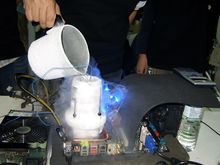
Liquid nitrogen may be used for cooling an overclocked system, when an extreme measure is needed.
Other cooling methods are forced convection and phase change cooling which is used in refrigerators. Liquid nitrogen, liquid helium, and dry ice are used as coolants in extreme cases, such as record-setting attempts or one-off experiments rather than cooling an everyday system. In June 2006, IBM and Georgia Institute of Technology jointly announced a new record in silicon-based chip clock rate above 500 GHz, which was done by cooling the chip to 4.5 K (−268.7 °C; −451.6 °F) using liquid helium.
These extreme methods are generally impractical in the long term, as they require refilling reservoirs of vaporizing coolant, and condensation can be formed on chilled components.
Moreover, silicon-based junction gate field-effect transistors (JFET) will degrade below temperatures of roughly 100 K (−173 °C; −280 °F) and eventually cease to function or "freeze out" at 40 K (−233 °C; −388 °F) since the silicon ceases to be semiconducting
so using extremely cold coolants may cause devices to fail.
Submersion cooling, used by the Cray-2 supercomputer, involves sinking a part of computer system directly into a chilled liquid that is thermally conductive but has low electrical conductivity. The advantage of this technique is that no condensation can form on components.
A good submersion liquid is Fluorinert made by 3M, which is expensive and can only be purchased with a permit.
Another option is mineral oil, but impurities such as those in water might cause it to conduct electricity.
Stability and functional correctness
As an overclocked component operates outside of the manufacturer's recommended operating conditions, it may function incorrectly, leading to system instability. Another risk is silent data corruption by undetected errors. Such failures might never be correctly diagnosed and may instead be incorrectly attributed to software bugs in applications or the operating system. Overclocked use may permanently damage components enough to cause them to misbehave (even under normal operating conditions) without becoming totally unusable.
In general, overclockers claim that testing can ensure that an overclocked system is stable and functioning correctly. Although software tools are available for testing hardware stability, it is generally impossible for any private individual to thoroughly test the functionality of a processor. Achieving good fault coverage requires immense engineering effort; even with all of the resources dedicated to validation by manufacturers, faulty components and even design faults are not always detected.
A particular "stress test" can verify only the functionality of the specific instruction sequence used in combination with the data and may not detect faults in those operations. For example, an arithmetic operation may produce the correct result but incorrect flags; if the flags are not checked, the error will go undetected.
To further complicate matters, in process technologies such as silicon on insulator, devices display hysteresis—a circuit's performance is affected by the events of the past, so without carefully targeted tests it is possible for a particular sequence of state changes to work at overclocked rates in one situation but not another even if the voltage and temperature are the same. Often, an overclocked system which passes stress tests experiences instabilities in other programs.
In overclocking circles, "stress tests" or "torture tests" are used to check for correct operation of a component. These workloads are selected as they put a very high load on the component of interest (e.g. a graphically-intensive application for testing video cards, or different math-intensive applications for testing general CPUs). Popular stress tests include Prime95, Everest, Superpi, OCCT, IntelBurnTest/Linpack/LinX, SiSoftware Sandra, BOINC, Intel Thermal Analysis Tool and Memtest86. The hope is that any functional-correctness issues with the overclocked component will show up during these tests, and if no errors are detected during the test, the component is then deemed "stable". Since fault coverage is important in stability testing, the tests are often run for long periods of time, hours or even days. An overclocked computer is sometimes described using the number of hours and the stability program used, such as "prime 12 hours stable".
Factors allowing overclocking
Overclockability arises in part due to the economics of the manufacturing processes of CPUs and other components. In most cases components with different rated clock rates are manufactured by the same process, and tested after manufacture to determine their actual ratings. The clock rate that the component is rated for is at or below the clock rate at which the CPU has passed the manufacturer's functionality tests when operating in worst-case conditions (for example, the highest allowed temperature and lowest allowed supply voltage). Manufacturers must also leave additional margin for reasons discussed below. Sometimes manufacturers produce more high-performing parts than they can sell, so some are marked as medium-performance chips to be sold for medium prices. Pentium architect Bob Colwell calls overclocking an "uncontrolled experiment in better-than-worst-case system operation".
Measuring effects of overclocking
Benchmarks are used to evaluate performance. The benchmarks can themselves become a kind of 'sport', in which users compete for the highest scores. As discussed above, stability and functional correctness may be compromised when overclocking, and meaningful benchmark results depend on correct execution of the benchmark. Because of this, benchmark scores may be qualified with stability and correctness notes (e.g. an overclocker may report a score, noting that the benchmark only runs to completion 1 in 5 times, or that signs of incorrect execution such as display corruption are visible while running the benchmark).
Given only benchmark scores it may be difficult to judge the difference overclocking makes to the overall performance of a computer. For example, some benchmarks test only one aspect of the system, such as memory bandwidth, without taking into consideration how higher clock rates in this aspect will improve the system performance as a whole. Apart from demanding applications such as video encoding, high-demand databases and scientific computing, memory bandwidth is typically not a bottleneck, so a great increase in memory bandwidth may be unnoticeable to a user depending on the applications used. Other benchmarks, such as 3DMark attempt to replicate game conditions.
Variance
The extent to which a particular part will overclock is highly variable. Processors from different vendors, production batches, steppings, and individual units will all overclock with varying degrees of success.
Manufacturer and vendor overclocking
Commercial system builders or component resellers sometimes overclock to sell items at higher profit margins. The retailer makes more money by buying lower-value components, overclocking them, and selling them at prices appropriate to a non-overclocked system at the new clock rate. In some cases an overclocked component is functionally identical to a non-overclocked one of the new clock rate, however, if an overclocked system is marketed as a non-overclocked system (it is generally assumed that unless a system is specifically marked as overclocked, it is not overclocked), it is considered fraudulent.
Overclocking is sometimes offered as a legitimate service or feature for consumers, in which a manufacturer or retailer tests the overclocking capability of processors, memory, video cards, and other hardware products. Several video card manufactures now offer factory overclocked versions of their graphics accelerators, complete with a warranty, which offers an attractive solution for enthusiasts seeking an improved performance without sacrificing common warranty protections. Such factory-overclocked products may cost a little more than standard components, but may be more cost-effective than product with a higher specification.
Naturally, manufacturers would prefer enthusiasts to pay additional money for profitable high-end products, in addition to concerns of less reliable components and shortened product life spans affecting brand image. It is speculated that such concerns are often motivating factors for manufacturers to implement overclocking prevention mechanisms such as CPU locking. These measures are sometimes marketed as a consumer protection benefit, which typically generates a negative reception from overclocking enthusiasts.
Advantages
- The user can, in many cases, purchase a lower performance, cheaper component and overclock it to the clock rate of a more expensive component.
- Higher performance in games, encoding, video editing applications, and system tasks at no additional expense, but at an increased cost for electrical power consumption. Particularly for enthusiasts who regularly upgrade their hardware, overclocking can increase the time before an upgrade is needed.
- Some systems have "bottlenecks," where small overclocking of a component can help realize the full potential of another component to a greater percentage than the limiting hardware is overclocked. For instance, many motherboards with AMD Athlon 64 processors limit the clock rate of four units of RAM to 333 MHz. However, the memory performance is computed by dividing the processor clock rate (which is a base number times a CPU multiplier, for instance 1.8 GHz is most likely 9x200 MHz) by a fixed integer such that, at a stock clock rate, the RAM would run at a clock rate near 333 MHz. Manipulating elements of how the processor clock rate is set (usually lowering the multiplier), one can often overclock the processor a small amount, around 100-200 MHz (less than 10%), and gain a RAM clock rate of 400 MHz (20% increase), releasing the full potential of the RAM.
- Overclocking can be an engaging hobby in itself and supports many dedicated online communities. The PCMark website is one such site that hosts a leader-board for the most powerful computers to be bench-marked using the program.
- A new overclocker with proper research and precaution or a guiding hand can gain useful knowledge and hands-on experience about their system and PC systems in general.
Disadvantages
Many of the disadvantages of overclocking can be mitigated or reduced in severity by skilled overclockers. However, novice overclockers may make mistakes while overclocking which can introduce avoidable drawbacks and which are more likely to damage the overclocked components (as well as other components they might affect).
General
- The lifespan of a processor may be reduced by higher operating frequencies, increased voltages and heat, although processors rapidly become obsolete in performance due to technological progress.
- Increased clock rates and/or voltages result in higher power consumption.
- While overclocked systems may be tested for stability before use using programs that "burn" the computer, these programs create an artificial strain that pushes individual or many components to their maximum (or beyond it). Some common stability programs are Prime 95, Super PI (32M), Intel TAT, LinX, PCMark, FurMark and OCCT. Stability problems may surface after prolonged usage due to new workloads or untested portions of the processor core. Aging effects previously discussed may also result in stability problems after a long period of time. Even when a computer appears to be working normally, problems may arise in the future. For example, Windows may appear to work with no problems, but when it is re-installed or upgraded, error messages may be received such as a “file copy error" during Windows Setup. Microsoft says this of errors in upgrading to Windows XP: "Your computer [may be] over-clocked. Because over-clocking is very memory-intensive, decoding errors may occur when files are extracted from the Windows XP CD-ROM".
- High-performance fans used for extra cooling can be noisy. Older popular models of fans used by overclockers can produce 50 decibels or more. However, nowadays, manufacturers are overcoming this problem by designing fans with aerodynamically optimized blades for smoother airflow and minimal noise (around 20 decibels at approximately 1 metre). The noise is not always acceptable, and overclocked machines are often much noisier than stock machines. Noise can be reduced by utilizing strategically-placed larger fans, which are inherently less noisy than smaller fans; by using alternative cooling methods (such as liquid and phase-change cooling); by lining the chassis with foam insulation; and by installing a fan-controlling bus to adjust fan speed (and, as a result, noise) to suit the task at hand. Now that overclocking is of interest to a larger target audience, this is less of a concern as manufacturers have begun researching and producing high-performance fans that are no longer as loud as their predecessors. Similarly, mid- to high-end PC cases now implement larger fans (to provide better airflow with less noise) as well as being designed with cooling and airflow in mind.
- Even with adequate CPU cooling, the excess heat produced by an overclocked processing unit increases the ambient air temperature of the system case; consequently, other components may be affected. Also, more heat will be expelled from the PC's vents, raising the temperature of the room the PC is in - sometimes to uncomfortable levels.
- Overclocking has the potential to cause component failure ("heat death"). Most warranties do not cover damage caused by overclocking. Some motherboards offer safety measures that will stop this from happening (eg. limitations on FSB increase) so that only voltage control alterations can cause such harm.
- Some motherboards are designed to use the airflow from a standard cpu fan in order to cool other heatsinks, such as the northbridge. If the cpu heatsink is changed on such boards, other heatsinks may receive insufficient cooling.
- Overclocking a PC component may void its warranty (depending on the conditions of sale).
- Changing the Heatsink on a Graphics Card often voids its warranty
Incorrectly performed overclocking
- Increasing the operation frequency of a component will usually increase its thermal output in a linear fashion, while an increase in voltage usually causes heat to increase quadratically. Excessive voltages or improper cooling may cause chip temperatures to rise almost instantaneously, causing the chip to be damaged or destroyed.
- More common than hardware failure is functional incorrectness. Although the hardware is not permanently damaged, this is inconvenient and can lead to instability and data loss. In rare, extreme cases entire filesystem failure may occur, causing the loss of all data.
- With poor placement of fans, turbulence and vortices may be created in the computer case, resulting in reduced cooling effectiveness and increased noise. In addition, improper fan mounting may cause rattling or vibration.
- Improper installation of exotic cooling solutions like liquid cooling may result in failure of the cooling system, which may result in water damage.
- With sub-zero cooling methods such as phase-change cooling or liquid nitrogen, extra precautions such as foam or spray insulation must be made to prevent water from condensing upon the PCB and other areas. This can cause the board to become "frosted" or covered in frost. While the water is frozen it is usually safe, however once it melts it can cause shorts and other malignant issues.
- Sometimes products claim to be intended specifically for overclocking and may be just decoration. Novice buyers should be aware of the marketing hype surrounding some products. Examples include heat spreaders and heatsinks designed for chips which do not generate enough heat to benefit from these devices (capacitors, for example).
Limitations
The utility of overclocking is limited for a few reasons:
- Personal computers are mostly used for tasks which are not computationally demanding, or which are performance-limited by bottlenecks outside of the local machine. For example, web browsing does not require a high performance computer, and the limiting factor will almost certainly be the bandwidth of the Internet connection of either the user or the server. Overclocking a processor will also do little to help increase application loading times as the limiting factor is reading data off the hard drive. Other general office tasks such as word processing and sending email are more dependent on the efficiency of the user than on the performance of the hardware. In these situations any performance increases through overclocking are unlikely to be noticeable.
- It is generally accepted that, even for computationally-heavy tasks, clock rate increases of less than ten percent are difficult to discern. For example, when playing video games, it is difficult to discern an increase from 60 to 66 frames per second (FPS) without the aid of an on-screen frame counter. Overclocking of a processor will rarely improve gaming performance noticeably, as the frame rates achieved in most modern games are bound almost exclusively by the GPU at resolutions beyond 1024x768. One exception to this rule is when the overclocked component is the bottleneck of the system, in which case the most gains can be seen.
Graphics cards

The BFG GeForce 6800GSOC ships with higher memory and clock rates than the standard 6800GS.
Graphics cards can also be overclocked,
with utilities such as EVGA's Precision, RivaTuner, ATI Overdrive (on ATI cards only), MSI Afterburner, Zotac Firestorm on Zotac cards, or the PEG Link Mode on ASUS motherboards. Overclocking a GPU will often yield a marked increase in performance in synthetic benchmarks, and usually will improve game performance too. Sometimes, it is possible to see that a graphics card is pushed beyond its limits before any permanent damage is done by observing on-screen distortions known as artifacts. Two such discriminated "warning bells" are widely understood: green-flashing, random triangles appearing on the screen usually correspond to overheating problems on the GPU itself, while white, flashing dots appearing randomly (usually in groups) on the screen often mean that the card's RAM is overheating. It is common to run into one of those problems when overclocking graphics cards. Showing both symptoms at the same time usually means that the card is severely pushed beyond its heat/clock rate/voltage limits. If seen at normal clock rate, voltage and temperature, they may indicate faults with the card itself. However, if the video card is simply clocked too high and doesn't overheat then the artifacts are a bit different. There are many different ways for this to show up and any irregularities should be considered but usually if the core is pushed too hard black circles or blobs appear on the screen and overclocking the video memory beyond its limits usually results in the application or the entire operating system crashing. Luckily though, after the computer is restarted the settings is reset to stock (Stored in the video card BIOS) and the maximum clock rate of that specific card has been found.
Some overclockers use a hardware voltage modification where a potentiometer is applied to the video card to manually adjust the voltage. This results in much greater flexibility, as overclocking software for graphics cards is rarely able to freely adjust the voltage. Voltage mods are very risky and may result in a dead video card, especially if the voltage modification ("voltmod") is applied by an inexperienced individual. A pencil volt mod refers to changing a resistor's value on the graphics card by drawing across it with a graphite pencil. This results in a change of GPU voltage. It is also worth mentioning that adding physical elements to the video card immediately voids the warranty.
Alternatives
Flashing and Unlocking are two popular ways to gain performance out of a video card, without technically overclocking.
Flashing refers to using the firmware of another card, based on the same core and design specs, to "override" the original firmware, thus effectively making it a higher model card; however, 'flashing' can be difficult, and sometimes a bad flash can be irreversible. Sometimes stand-alone software to modify the firmware files can be found, i.e. NiBiTor, (GeForce 6/7 series are well regarded in this aspect). It is not necessary to acquire a firmware file from a better model video card (although it should be said that the card in which firmware is to be used should be compatible, i.e. the same model base, design and/or manufacture process, revisions etc.). For example, video cards with 3D accelerators (the vast majority of today's market) have two voltage and clock rate settings - one for 2D and one for 3D - but were designed to operate with
three voltage stages, the third being somewhere in the middle of the aforementioned two, serving as a fallback when the card overheats or as a middle-stage when going from 2D to 3D operation mode. Therefore, it could be wise to set this middle-stage prior to "serious" overclocking, specifically because of this fallback ability - the card can drop down to this clock rate, reducing by a few (or sometimes a few dozen, depending on the setting) percent of its efficiency and cool down, without dropping out of 3D mode (and afterwords return to the desired high performance clock and voltage settings).
Some cards also have certain abilities not directly connected with overclocking. For example, NVIDIA's GeForce 6600GT (AGP flavor) features a temperature monitor (used internally by the card), which is invisible to the user in the 'vanilla' version of the card's BIOS. Modifying the BIOS can allow a 'Temperature' tab to become visible in the card driver's advanced menu.
Unlocking refers to enabling extra pipelines and/or pixel shaders. The 6800LE, the 6800GS and 6800 (AGP models only) and Radeon X800 Pro VIVO were some of the first cards to benefit from unlocking. While these models have either 8 or 12 pipes enabled, they share the same 16x6 GPU core as a 6800GT or Ultra, but may not have passed inspection when all their pipelines and shaders were unlocked. In more recent generations, both ATI and Nvidia have laser cut pipelines to prevent this practice.
It is important to remember that while pipeline unlocking sounds very promising, there is absolutely no way of determining if these 'unlocked' pipelines will operate without errors, or at all (this information is solely at the manufacturer's discretion). In a worst-case scenario, the card may not start up ever again, resulting in a 'dead' piece of equipment. It is possible to revert to the card's previous settings, but it involves manual firmware flashing using special tools and an identical but original firmware chip.


